
HomeScheduled Messages
Schedule text messages on Android
Write now, send later. Perfect for birthdays, reminders and messages you want to arrive at the right time.
How scheduling works
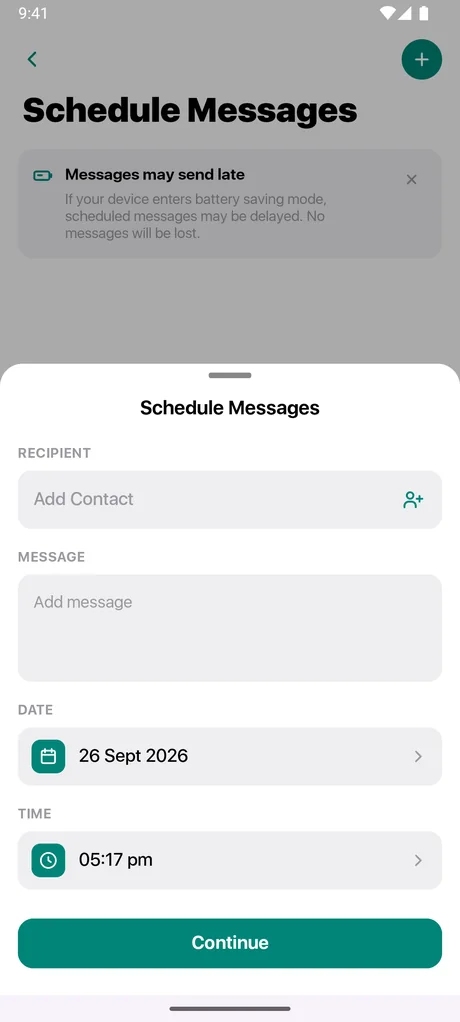
On the Messages home screen, open Schedule Messages (under Scheduled & Favorites), tap the schedule icon, choose a contact or enter a number, write your message and pick a date and time in the future. Messages sends it automatically at that time.
Manage scheduled messages
All your upcoming messages are listed in one place. Open one to change the text, contact or time, or delete it before it sends.
For reliable delivery
- Messages must be your default SMS app.
- Android may ask you once to allow exact alarms so messages send on time.
- If your phone is in battery saver mode, a message may be delayed. It is not lost.
- Standard carrier SMS charges still apply.
Questions about scheduled messages
Can I schedule a text for later?
Yes. Write your message, pick a date and time in the future, and Messages sends it automatically. You can edit or delete scheduled messages from the Schedule Messages screen. If your phone is in battery saver mode, a scheduled message may be delayed, but it is not lost. Scheduled messages are restored after a restart or an app update, and one that came due while the phone was off is sent when it starts again (if it is less than 24 hours late). See Scheduled Messages.
Does it support dual SIM?
Yes. If your phone has two active SIMs, you can choose which one sends your messages, or set the app to ask you each time.
My message did not send.
Check that Messages is your default SMS app, that you have signal, and that the right SIM is selected. Picture and group messages also need MMS enabled on your plan. Tap a failed message for options. If it keeps happening, contact support and tell us your phone model and Android version.
Related
Get Messages - SMS Texting on Android
Free to download. Set it as your default SMS app and take control of your inbox in a minute.