
HomeSmart Message Filters
Smart message filters for your SMS inbox
Sort bank alerts, order updates, offers and reminders automatically, and focus on the messages that matter.
What are smart message filters?
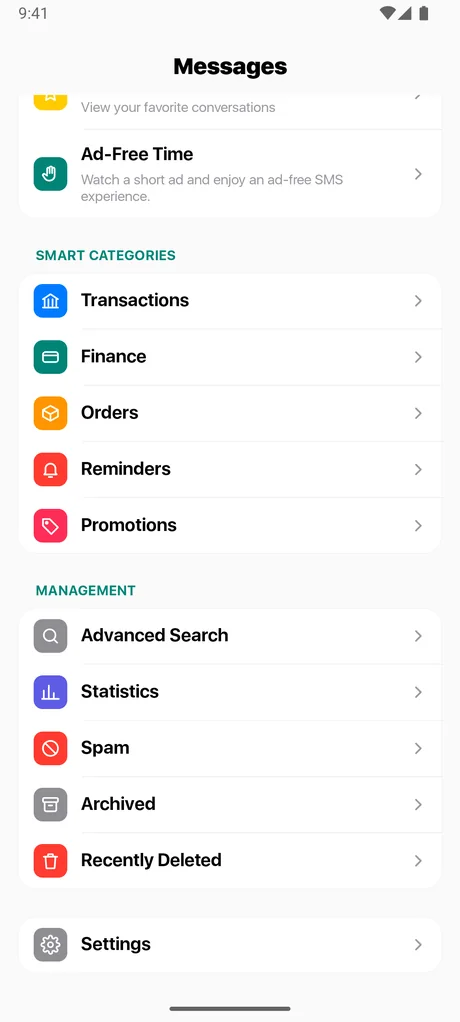
Smart filters group your messages into categories so you do not have to scroll through everything to find a bank alert, a delivery update or a one-time code. Open the Messages home screen, choose a category, and Messages shows just those conversations.
Categories available
- Transactions and Finance for bank alerts, payments and transactions
- Orders for shopping, food delivery and packages
- Promotions for deals, coupons and marketing messages
- Reminders for appointments, events and notifications
- Known Senders and Unknown Senders
- Unread messages, Spam and Archived
Why it helps
Text inboxes mix personal chats with automated messages. Filtering keeps the two apart, so a message from a friend is not buried under promotions, and a payment confirmation is one tap away.
Good to know
Categories are assigned automatically and may not be perfect for every sender or region. You can always view All Messages. Filtering happens on your device.
Questions about smart message filters
Are smart filters free?
Yes, smart filters are included in the free app.
Do filters send my messages anywhere?
No. Your messages stay on your device. See the Privacy Policy.
Can I block numbers?
Yes. You can block a number from a conversation and manage the list under Blocked Numbers. You need to be using Messages as your default SMS app for blocking to work.
Related
Get Messages - SMS Texting on Android
Free to download. Set it as your default SMS app and take control of your inbox in a minute.