
HomeBest SMS App for Android
The best SMS app for Android
A good texting app should be fast, private and help you cope with a busy inbox. Here is what to look for, and how Messages - SMS Texting does it.
Last updated:
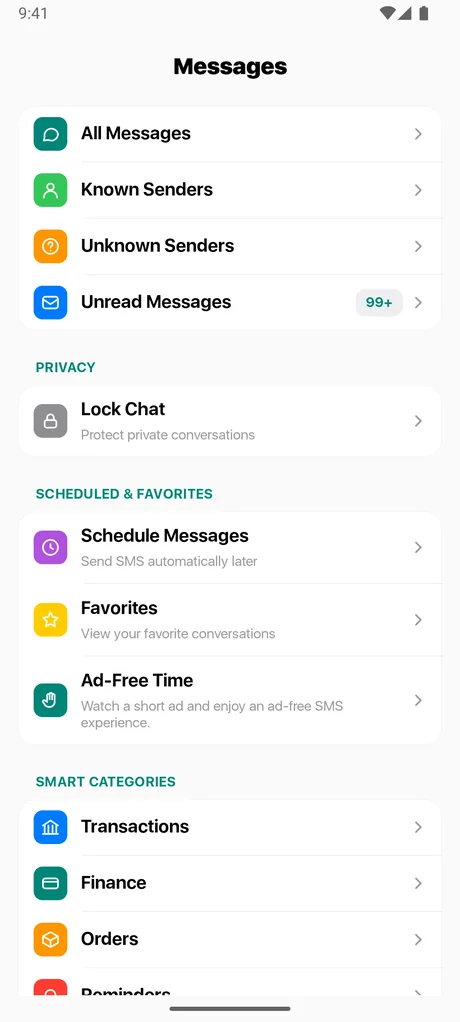
The best SMS app depends on what you need. If you want a clean inbox, Messages - SMS Texting sorts texts into smart categories, lets you schedule messages, lock private chats and choose which SIM sends on dual-SIM phones. It is free and works on Android 7.0 and newer.
What makes a good Android SMS app?
Almost every phone comes with a texting app, but a dedicated SMS app can do more. When you compare options, these are the things that matter most day to day.
1. A clean inbox with smart sorting
Bank alerts, delivery updates, one-time codes and promotions all arrive as texts. Messages - SMS Texting sorts them into Transactions, Finance, Orders, Reminders and Promotions, plus Known Senders, Unknown Senders, Unread and Spam views, so the texts that matter are easy to find. See smart message filters.
2. Send later and stay organised
Write a message now and pick the date and time it should go out. This is handy for birthdays and reminders. See scheduled messages.
3. Privacy you control
Your messages stay on your device and the app has no user accounts. You can lock individual chats with a PIN, fingerprint or face unlock. See Chat Lock.
4. Dual-SIM support
If your phone has two SIMs, choose which one sends your texts or be asked each time. See dual SIM SMS app.
5. Everyday essentials
- SMS and MMS with photos, files, locations and contact cards
- Group chats, with optional Group MMS
- Advanced Search, in-chat search and voice search
- Block numbers, pin, favorite and archive conversations
- Recently Deleted with 40-day recovery
- Export a conversation as TXT or PDF
- Six home-screen widgets, light and dark themes, and 30+ languages
Is it free?
Yes. Messages - SMS Texting is free and supported by ads. You can watch a short rewarded ad to switch off banner and full-screen ads for a while.
Comparing it with the stock app? Read Messages - SMS Texting vs Google Messages.
Frequently asked questions
What is the best SMS app for Android?
The best SMS app depends on what you need. If you want a clean inbox, Messages - SMS Texting sorts texts into smart categories, lets you schedule messages, lock private chats and choose which SIM sends on dual-SIM phones. It is free and works on Android 7.0 and newer.
Do I need a separate SMS app?
Not necessarily, but a dedicated app can add tools such as filters, scheduled texts and chat lock that your phone's built-in app may not offer.
Is Messages - SMS Texting free?
Yes. It is free to download and use, and supported by ads.
Related
Get Messages - SMS Texting on Android
Free to download. Set it as your default SMS app and take control of your inbox in a minute.