
HomeSMS App for Seniors
Best SMS app for seniors
A good texting app for an older adult is clear, forgiving and free of clutter. Here is what to look for.
Last updated:
Look for a simple conversation list, easy search including voice search, readable text, privacy and scam protection. Messages - SMS Texting offers these, though it is a general app with many features.
What to look for
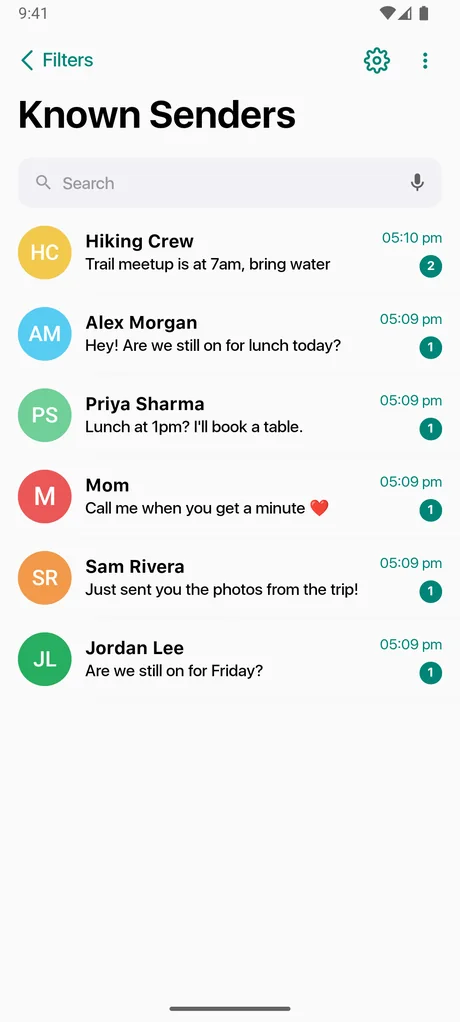
- A clear, simple conversation list with large names, readable previews and an obvious unread count.
- Easy ways to find a message, including voice search, so typing is optional.
- Readable text. Increase Android’s font and display size in Settings, then check how the app looks.
- Privacy and no accounts, so there is nothing to sign in to or forget.
- Protection from scams, such as a Spam view and the ability to block numbers.
- Easy recovery if something is deleted by mistake.
How Messages - SMS Texting fits
- Conversations are shown in a clean list with contact avatars, previews and unread counts.
- Advanced Search, in-chat search and voice search are built in.
- Light and dark themes, plus accent colors, so you can pick what is easiest to read.
- Home-screen widgets show unread messages at a glance.
- No user accounts. Messages stay on the device.
- Block spam texts and use the Spam and Unknown Senders views.
- Recently Deleted keeps deleted conversations for 40 days.
Be honest about the trade-offs
- The app is not designed only for seniors. It has many features, so you may want to set it up for them first.
- It is free and supported by ads, which can confuse some people. Ad-Free Time lets you switch some ads off for a while by watching a short ad.
Helping a relative get started
- Install the app and set it as the default SMS app.
- Choose the theme and accent color they find easiest to read.
- Add a widget to the home screen.
- Show them how to block a number and how to restore a deleted chat.
- Remind them never to share one-time codes or tap links from unknown senders.
Compare more options in the best SMS app for Android.
Frequently asked questions
What is the best SMS app for seniors?
Look for a simple conversation list, easy search including voice search, readable text, privacy and scam protection. Messages - SMS Texting offers these, though it is a general app with many features.
Can I make text bigger?
You can increase Android's font and display size in Settings. Check how the app looks after changing it.
Is Messages - SMS Texting free?
Yes. It is free and supported by ads. A short rewarded ad switches off some ads for a while.
Related
Get Messages - SMS Texting on Android
Free to download. Set it as your default SMS app and take control of your inbox in a minute.