
HomeNot Receiving Texts
Not receiving texts on Android?
Missing messages usually come down to a handful of settings. Work through this list from the top.
Last updated:
Common causes are the app not being the default SMS app, no signal or SIM, a blocked number, a muted or filtered conversation, notifications turned off, or battery optimization stopping the app in the background.
1. Is Messages your default SMS app?
Android only delivers new texts to the default SMS app. If you chose Not now – just read my messages, the app is in read-only mode and new texts will not arrive in it. Set it as the default. See default SMS app.
2. Signal and SIM
- Turn off airplane mode and check you have mobile signal.
- Make sure a SIM is inserted and turned on, and that your plan can receive texts.
- On a dual-SIM phone, the message may arrive on the other SIM’s number. Check which SIM is active.
3. Is the message hidden by a filter?
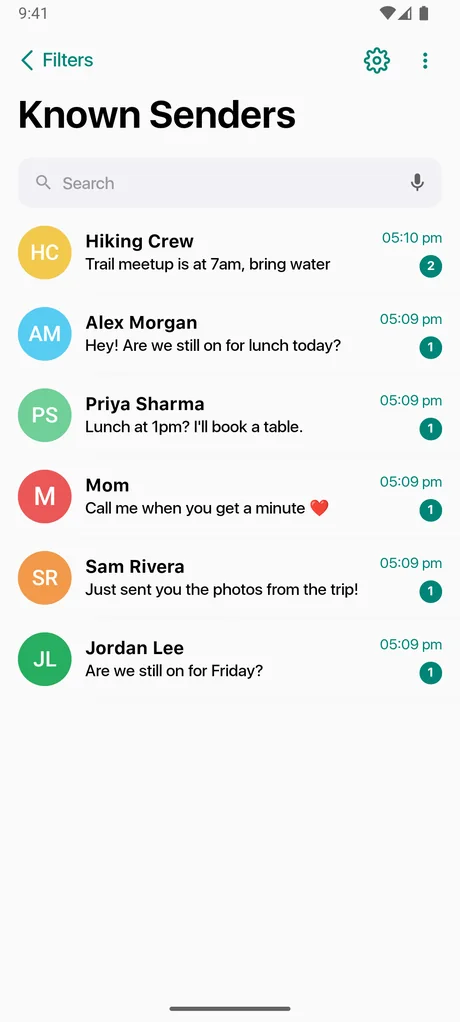
- Open All Messages to see everything. Smart categories and views such as Unknown Senders or Spam show only part of your inbox.
- Check Blocked Numbers. A blocked sender cannot message you.
- Check whether the conversation is muted or archived.
4. Notifications and battery
Allow notifications for the app, turn off Do Not Disturb, and set battery optimization to Unrestricted. Samsung and Xiaomi phones are strict about background apps. See Samsung and Xiaomi fixes.
5. Picture and group messages
MMS needs mobile data and MMS support on your plan. See Group MMS vs SMS.
6. Codes from banks and apps
Short-code messages such as one-time codes can be delayed by the sender or carrier. Wait a minute, then request a new code. Never share a code with anyone who contacts you.
Still missing messages? Contact support with your phone model and Android version. Menu names can differ by phone and Android version.
Frequently asked questions
Why am I not receiving text messages on Android?
Common causes are the app not being the default SMS app, no signal or SIM, a blocked number, a muted or filtered conversation, notifications turned off, or battery optimization stopping the app in the background.
Why do new texts not appear in read-only mode?
In read-only mode Messages is not your default SMS app, so Android does not deliver new texts to it. Set it as the default to receive messages.
Could a filter be hiding my message?
Yes. Smart categories and views show only part of your inbox. Open All Messages to see every conversation.
Related
Get Messages - SMS Texting on Android
Free to download. Set it as your default SMS app and take control of your inbox in a minute.