
HomeSchedule a Birthday Text
Schedule a birthday text on Android
Never miss a birthday, anniversary or reminder. Write the message now and let the app send it on time.
Last updated:
Yes. In Messages - SMS Texting, open Schedule Messages, choose a contact, write your message and pick a future date and time. The app sends it automatically.
Schedule it in four steps
- Make sure Messages - SMS Texting is your default SMS app.
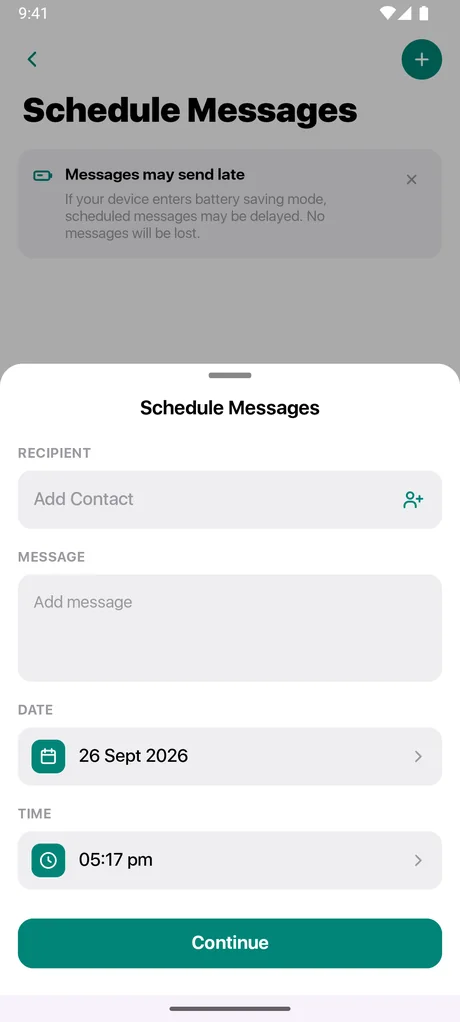
- On the home screen, open Schedule Messages (under Scheduled & Favorites).
- Tap the schedule icon, then choose a contact or enter a number.
- Write your message, pick a future date and time, and save.
You can edit or delete it from the same screen before it sends.
Ideas for scheduled texts
- Birthday and anniversary wishes sent at midnight
- Reminders to a family member about an appointment
- Rent, bill or payment reminders
- Messages to friends in another time zone, timed for their morning
Make sure it sends on time
- Allow exact alarms if Android asks, so messages go out on time.
- Battery saver may delay a scheduled message. It is not lost.
- Scheduled messages are restored after a restart or app update. One that came due while the phone was off is sent at startup if it is less than 24 hours late.
- Standard carrier SMS charges apply, and a SIM with signal is needed at send time.
More detail on scheduled messages. On a dual-SIM phone, see choosing the sending SIM.
Frequently asked questions
Can I schedule a text on Android?
Yes. In Messages - SMS Texting, open Schedule Messages, choose a contact, write your message and pick a future date and time. The app sends it automatically.
What if my phone is off at the scheduled time?
A message that came due while the phone was off is sent when it starts again, if it is less than 24 hours late.
Can I edit a scheduled message?
Yes. Open it from the Schedule Messages screen to change the text, contact or time, or delete it before it sends.
Related
Get Messages - SMS Texting on Android
Free to download. Set it as your default SMS app and take control of your inbox in a minute.