
HomeOrganize Bank & OTP Texts
Organize bank, order and OTP texts
Important texts get buried under promotions. Smart categories keep bank alerts, orders and reminders where you can find them.
Last updated:
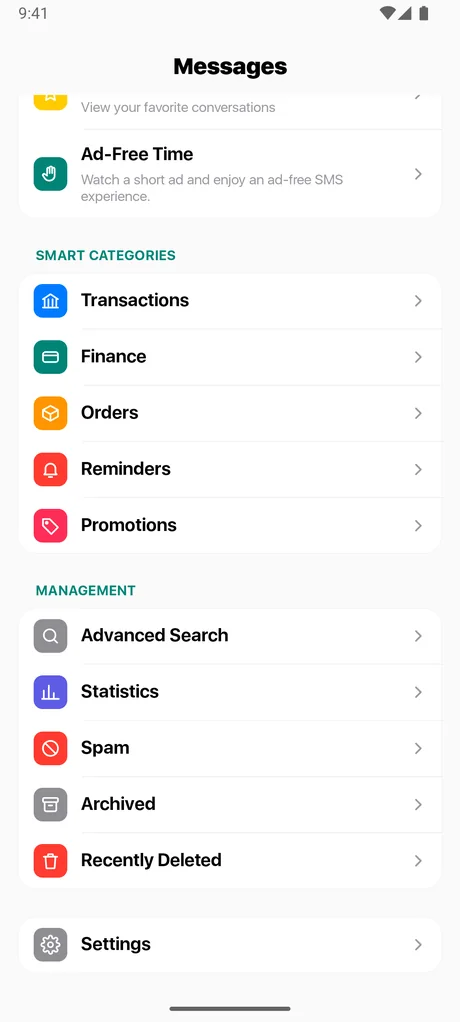
In Messages - SMS Texting, choose the Transactions or Finance smart category on the home screen. Texts are sorted automatically, and you can search across every message with Advanced Search.
Why important texts get lost
Banks, delivery companies, shops and apps all send texts from short codes and unknown numbers. In a busy inbox, a payment alert or a delivery update can sit under dozens of promotions.
Smart categories
Messages - SMS Texting automatically sorts your inbox into Transactions, Finance, Orders, Reminders and Promotions. It also offers Known Senders, Unknown Senders, Unread and Spam views. Choose a filter on the home screen to focus on one kind of message. See smart message filters for the full list.
Find a specific message
- Advanced Search looks across every message. Locked chats stay private.
- Search inside a chat finds text in one conversation.
- Voice search helps when your hands are busy.
Keep important texts safe
- Pin or favorite conversations you open often.
- Export a conversation as PDF or TXT to keep a record.
- Lock sensitive chats with Chat Lock.
Stay safe with one-time codes
- Never share a one-time code (OTP) with anyone who contacts you, even if they say they are from your bank.
- Banks do not ask for codes or PINs by text or phone.
- If a message looks suspicious, do not tap its link. Block the number.
Categories are sorted automatically and may not catch every message. Menu names can differ slightly between app versions.
Frequently asked questions
How do I organize bank texts on Android?
In Messages - SMS Texting, choose the Transactions or Finance smart category on the home screen. Texts are sorted automatically, and you can search across every message with Advanced Search.
Can I keep OTP and bank messages private?
Yes. Messages are stored on your device, and you can lock individual conversations with a PIN, fingerprint or face unlock using Chat Lock.
Are categories always correct?
Sorting is automatic and may not be perfect for every sender. You can always find a message with search.
Related
Get Messages - SMS Texting on Android
Free to download. Set it as your default SMS app and take control of your inbox in a minute.